On social media, increasing audience engagement is like keeping
the attention of a two-year-old. There’s so many things published each
day that we’re often “on to the next” before finishing the content in
front of us.
So as a brand, the social competition can make it feel impossible to
keep your audience engaged and focused. You can’t expect everyone to
like what you post on social media, but there are ways to stay current
and relevant by posting content viewers will want to read.
Before we get too far into what makes up this content, let’s actually look at what defines audience engagement on social media.
What is Audience Engagement?
Audience engagement is a marketing process that guides potential and
current customers to take actions whether it’s clicking a link or
signing up for a trial. Successful audience engagement will lead
prospects through the marketing funnel and keep them coming back.
On social media, audience engagement can be defined as clicks,
impressions, profile views, likes and shares. The more active users are
with your social content, the more likely they’ll continue to follow and
trust your brand.
There’s so much that goes into building an engaged audience on social
media. It takes great content, attention-grabbing visuals or details
and subject matter that’s original and fully entices readers to go
forward.
In order to gauge how engaging your social media content is, ask yourself these questions:
Does Your Content Pique Curiosity?
Marketers often rely on social media to get users from point A to
point B. This means social media posts have to engage users and make
them want to read or learn more. You often can’t rely on 140 characters
to fully explain one of your marketing landing pages. However, you can direct users to these pages with engaging illustrations, videos and Tweets that have a call to action. These phrases should focus on the results. Don’t be ambiguous with what users will see if they click on your link.
Instead, you have to pique curiosity by making a promise or
highlighting a subject they might not know a lot about. Levis does this
with its Instagram by showcasing its women’s commuter shorts. As a brand
on social media, you have to keep the attention of your audience, but
also drive them to where you want them to go.
You can also do this by creating excitement on social media. Running contests, user-generated content and other social media sharing campaigns can seriously pay off. Building excitement can get your audience to engage with your content.
Is Your Content Unique?
It’s important to ask yourself this question regularly. What makes
you stand out in the crowd? If your content is the same as everyone else
in your industry, what’s going to push you above the rest? You don’t have to surprise or shock your audience to get them to
engage. Stick to your brand’s main message and identity. People always
relate with truthfulness and like-minded content that resonates.
Finding the balance between amicable and unique content can be
challenging. However, it always pays to be engaging and create posts
that ask questions, inherit a response or highlight an individual.
Focusing on engaging posts will not only make you unique but build a
better connection between your brand and those who follow you.
Does Your Content Make Sense?
If you’re posting content about gardening tips, but run social media
for a coffee shop, you’re obviously not hitting the right audience. Even
if the content is helpful, fresh and enticing, you still need to stick
to your industry.
There are plenty of angles you can take if you’re considered to be in
a “boring industry.” If you need any helpful tips, do some social media
competitive research to find out what they’re posting. Like we
mentioned before, you need to be unique.
So don’t simply post the same content and hope for similar results.
Try to build your audience engagement by posting unique content that
most readers would expect. There’s a way to spark interest and still be
on topic.
Choose the Best Network for Audience Engagement
After you’ve asked the questions above, you need to know how to boost
engagement on each social network. Every social media channel works in
its own way, which can get confusing for some marketers.
Social Media Examiner’s 2016 Social Media Marketing Industry Report discovered 86% of marketers are confused
on how to find their target audience through social media. While it
might seem simple enough to post creative content to resolve targeting,
you actually need to be relevant and post for the right audience.
And for each social media network, the way you capture your
audience’s attention changes. Let’s take a look at the major social
media channels to see how audience engagement works differently across
the board:
Audience Engagement on Twitter
With more than 500 million Tweets per second and the fact that less than 50% of users login to Twitter daily means you should aim to strike gold regularly on the network.
Twitter is known for its free-flow of communication, which means you
have a huge opportunity to engage. The speed of Twitter doesn’t have to
be gloom and doom. Instead, use Twitter’s speed to get your point across
more effectively at the right times.
Maintaining engagement is always a great way to never let the conversation sour. According to a Co-Schedule report,
the best times to post for maximum engagement are noon, 3 p.m. and 5
p.m. to 6 p.m. Setting a schedule to post at those exact times can be
tricky.
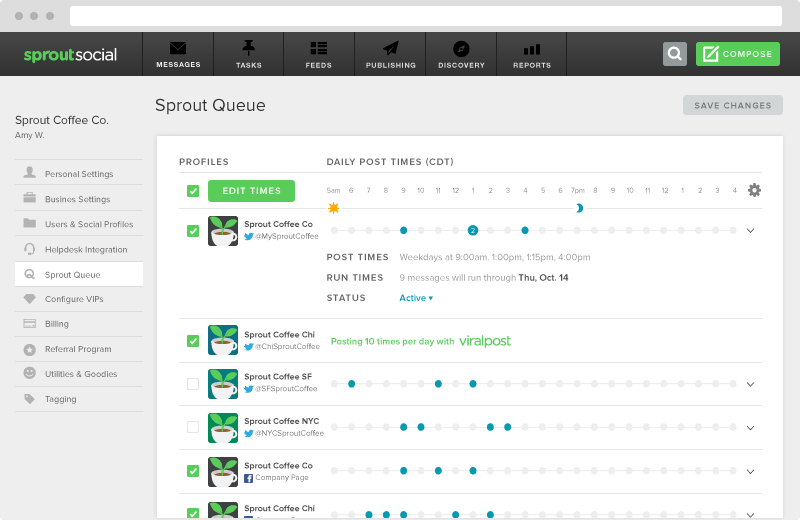
But with Sprout Social’s intuitive ViralPost feature, you can simply schedule a post
to publish based on when your most engaged readers are present. Take
the guesswork out of when to publish and let ViralPost do the work for
you.
Audience Engagement on Facebook
Approximately half-of-a-billion people watch 100 million hours of video
on Facebook every single day. With those kinds of numbers, it’s
clear why so many businesses see success with audience engagement and
building with video.
According to Gary Vaynerchuk, Facebook puts significantly more weight on video content
through its Newsfeed algorithm so followers have a better chance to
view. Facebook is the ultimate video network for marketers and there’s
no reason why any of your video content shouldn’t exist here.
If you don’t have a large video or product team, think of other ways
you can focus on engaging your audience with video content. In fact,
numerous brands have noted at least 85% of their videos are viewed without sound.
Hipmunk
does a great job at creating Facebook videos that show you the new way
to search for hotels on it’s site. You don’t need sound and it’s visuals
would catch most scrolling through their Newsfeed. People want to view
your content and get onto the next. So it’s critical to keep users
around with the visual medium. Try uploading videos from Instagram so
you can style, edit and better present your content on Facebook.
Audience Engagement on Instagram
There’s no doubt that Instagram is all about the visuals. With the newest Instagram feature called
Stories, more people are turning visual even in the way they chat.
Because you can only link in your bio, it makes it hard to get your
audience to your marketing pages. You have to get creative with this social network over almost all the
others. Colors play a big part in marketing your products or services.
In our Instagram best practices infographic, we highlighted how 93% of buyers noted “visual appearance” as the main reason for making a purchasing decision.
This same approach should go for engaging your audience. Visual
content is more likely to be clicked and shared. Additionally, you want
to ensure your Instagram captions are just as to the point as your Tweets.
Captions are what drives your audience to answer questions, share
your post or leave a comment. Just remember to always refer back to your
Instagram bio for the link.
Audience Engagement on LinkedIn
Known as the biggest community of professionals, LinkedIn is a venue
many marketers look to when building an audience.
LinkedIn is a great
space for businesses to promote their evergreen content and get groups
back to your page.
LinkedIn is about bringing people together in groups who might be
looking for the same content. Your brand can excel by posting relevant
industry content in areas where it fits. Although LinkedIn can be great for lead generation, remember not to be spammy with your content.
Like every social network, engagement is a two-way street. You have
to participate, communicate and give feedback to get others interested
in your brand. However, using LinkedIn to publish content a great way to grow your business.
Additionally, LinkedIn content can be indexed just like your blog. This means you want to focus on SEO basics for social media.
Ensure you have the proper links directed back to your site and that
you have optimized your content to target specific keywords. This will help you get your LinkedIn content ranking on search engines, so never discount SEO on this social network.
Effectively Measure Audience Engagement
After determining your content strategy and best social media channel
to engage, you need to measure how well your content performs.
Measuring audience engagement can be done on several native platforms,
but their social media analytics only dive so far. With tools like Sprout Social, you can take engagement analytics even further. You can track metrics like:
Inbound message vs. replies
Daily response times
Daily response rates
Response time distribution
At the same time, features like Facebook analytics tools show audience growth rates to measure your different campaigns and peak engagement times.
Don’t just rely on vanity metrics like shares and likes. Dig deeper
into audience growth patterns and see what content is working
successfully.
Always Look for Improvements
Engaging your audience can bring a lot of challenges to your brand.
But this shouldn’t deter you from wanting real social media audience
engagement. By analyzing your content, post times and publishing habits,
you’ll discover what works and what needs improvement.
The Instagram changes keep on rolling in, and the latest round has ruffled a few feathers online.
I try to hang back on commenting too soon on these things because
there’s always a lot of panic and rumour. On this occasion, it’s also
not something I’ve experienced personally, or any of my clients or
students have reported experiencing, which makes it harder to wade in.
So I’ve hung back a little & tried to suss things out.
Therefore, the following is based partly on reading (links at the
bottom), and partly on conjecture based on my weirdly obsessive Insta
insight.
‘Shadowbans’
Years ago I ran an internet forum with friends. We had one member
join to troll everyone with vile, far-right politics, and he was
persistent, bullying and cruel. After trying various techniques to get
rid of him, we hit upon the relatively new concept of a shadowban.
Unlike under a standard ban from a site or forum, a shadowbanned user
sees nothing unusual. They can log in as usual, respond to posts. What’s
different is, nobody else can see them.
They’re shouting – or posting – into the abyss.
It’s cruel and hilarious – and it’s not quite what’s happening on Instagram.
People are calling what’s happening a shadowban because it functions superficially similarly. Some users – and we’ll look at the who & why in a minute – find their engagement suddenly plummets.
Everything looks to be as normal from their end, so it’s hard to figure
out why – until they log out, or check for their posts from an account
that doesn’t follow them. Then they see that their post is not showing
in any of the hashtag grids that they have posted with. They’re essentially invisible.
Here’s one more example. Viewed from the photographer’s business
profile, the circled photo is there. Viewed from another account, it’s
gone:
The significance of hashtags
I’ve talked before about why hashtags are an essential tool
for getting your images seen on Instagram. Without them you’re
essentially posting as private, to only your followers. So suddenly
being removed from all hashtag visibility absolutely would account for a
big drop in engagement, and is worrying indeed. But why would this happen?
Bad behaviour
It’s been suggested that certain behaviours might make a user
vulnerable to a ‘shadowban’. Remember that any process like this is
going to be entirely automated, given the sheer volume of accounts using
Instagram every hour – so there’s going to be a big margin for error.
Essentially it’s the same bad practice I always advise against in my
podcast and courses – which may go some way to explaining why none of my
clients have reported it.
Things like:
Repeatedly using the same hashtags, every day
Using bots or automated likes
Follow-to-unfollow practice, either via automation or manually
Repeatedly leaving low value, unoriginal comments
Behaving in any inauthentic or system-gaming way
To remove a ‘shadowban’ then, a user needs to refrain from these
activities. Reports suggest bans can lift in a couple of days, and that
taking a break from posting at all might be beneficial if you think
you’re affected. However…
My take
I’m not convinced there is a punishment-and-reward system at
play. Instead, I suspect they’ve simply done what I’ve been waiting
on for some time now, and introduced an algorithm for the hashtag pages.
When Instagram removed our chronological home feeds, they took away
the ability to see content by recency, and instead took control of what
we see and when. There are obvious benefits for them as a business in
doing this – the ability to keep users engaged, direct them to trends or
content that they want to promote, and most of all, the advertising
potential.
There are already algorithms that determine how we see our Home
feeds, our Explore pages and Search results, and these are entirely
individual. What I see will not be the same as what you, or anyone else
sees when they log into the app. They are based on your own individual
activity.
The one place that was the exception to this was the hashtag pages.
Search for a tag, and you could see any posts in chronological order,
with most recent showing first. It allowed people to continue to
browse by recency instead of using the pathways IG had selected.
A few months back, the algorithm method was extended to the top
hashtag grid – you know those nine posts at the top of any hashtag you
search for? Those stopped being universal – now they’re the top posts
for you, based on what you usually like and interact with. (Or,
if we’re being a touch more cynical, based on what Instagram wants you
to like and interact with .)
You might be top of the grid for yourself, but not for your husband,
for example, because you both tend to like and click on different
things.
It seems reasonable then to assume that they would next be extending
this to hashtags as a whole. Certainly, this would cause some people’s
posts to not be visible to all accounts – because, a little like the
Explore page, you have to earn your exposure there based on the quality of your posts.
This is sometimes called a ‘goodness score’ – based on things like how
many comments, likes, clicks, saves, replies, follows you get.
The better a post scores, the better your exposure for that, and probably your next, post.
If you’re playing the system or using bots, then of course,
your score is going to be screwed. You’re interacting with hundreds of
accounts, many of whom will never return the favour. Your ratios are
low, your demographics are all over the place and you’re probably
receiving an awful lot of likes from other automated accounts in return.
Instagram’s system has no idea who to promote you to, so you’re never
deemed relevant to any particular hashtag, and you’re rarely visible on
the grids.
On the other hand, if you’re using good practice, hashtagging
appropriately, interacting within your niche and being a real human
being – hurray! You should be fine! You might see a slight decline in
your daily engagement, but that should be in line with everyone else on
instagram, so nothing to worry about.
And when a post does hit the hashtag grids, it’s likely to reap
way more visibility than previously, and you’ll see posts going a bit
nuclear like we did with the ‘top hashtag’ grids before
Instagram algorised (I made that word up) them.
Have you experienced shadow banning? What are your thoughts about it?
Building social media traffic is a lot like a city planner knowing
how to efficiently get traffic in and out of a city. If each roadway
into a city is a different source of website visitors, your social media
traffic should certainly be a pillar to your highway infrastructure.
Getting people to your website through social media engagement can be tricky, especially if you’re on a limited budget and already attempting paid advertising. While paid social can certainly help boost your website traffic, how do you get people to go to your social channels?
As we all know, social media has the ability to be a major source of
traffic to your site. The larger presence you build on social media, the
more you can rely on steady social media traffic to your site.
How Do You Increase Social Media Traffic?
Increasing your social media traffic happens when you engage and
build relationships on each network. Being readily available for
customers, brand loyalists and potential buyers it helps you nurture these people through the purchasing process.
Each social network is different, but to get an immediate boost in
your social traffic, there are some steadfast rules to follow for all
your social channels. Remember that your content says everything about
your brand, so make sure your blog posts, case studies or infographics
go above and beyond to make the social sharing aspect greater.
To get your social media traffic rolling, follow these six steps to
get people to your social channels and ultimately to your website:
1. Inspire Your Audience With Visuals
First impressions are essential. We always say “Don’t judge a book by
its cover,” but more times than not, visuals help us make decisions. In
fact, Adobe’s Q4 2013 Index showed social media posts with images
create 650% more engagement than text posts.
People want visual content to help make sure their purchasing
decisions are valid. When customers are able to view a product video or
demo, they are 85% more likely to make a buying decision right there
when compared to reading a text review.
Master Instagram
On social media, you have to use visuals to drive traffic to your
website. One of the best avenues for visuals continues to be Instagram.
With more than 80 million photos and videos shared each day, there’s a lot of competition.
But when you’re able to create beautiful and engaging content on
Instagram, businesses see a difference. According to data from
Instagram, brands see the highest level of engagement (4.21%) on Instagram when compared to other social networks.
Nearly three-fourths of Instagram comments are made within two days
of the post, which shows its high impact on on brand’s Instagram
strategies.
Provide awesome visuals that not only stand out, but speak volumes
about you, your product and your story. The best visuals on social media
tend to include:
Vibrant colors and well-designed layouts
High-level photography
Visuals telling stories
Visuals showing products or services in a new light
Consistently on point and well-planned
2. Make Your Content Easily Shareable
Every marketer or business owner by now should know the importance of being mobile friendly. Data from ComScore
showed in 2013, 65% of time spent on social media was through a mobile
device. Almost 40% of news content was read on a mobile device compared
to a desktop.
Living in a mobile age means your content has to be easy to read, but
more importantly, simple to share. Share buttons on mobile devices are
critical to driving social media traffic. Neil Patel explained it by stating the harder it is for your audience to share your content, the less likely they will.
Use Social Media Plugins & Buttons
Get readers to share your content by using social media plugins. There are various plugins that can help you spread your content via social media much easier. One of the avenues is using click to Tweet, which allows readers to highlight parts of your content to share on social without leaving the page.
Secondly, you have to include social media buttons
that are mobile friendly and don’t distract your readers while
scrolling. According to Slate and Chartbeat, most readers only make it halfway down page, which means you have to optimize where you want to place your social media buttons.
Use free heat map plugins like SumoMe
(for WordPress) to see where people are clicking the most on your blog
content. Once you have a good idea of an area with high click volume,
add your social share buttons there to immediately increase traffic.
3. Improve Your SEO
While you want it to be easy for readers to share your content, you
also need to ensure your content is being shared correctly and
effectively. Digital marketing has grown immensely, which means at some
point you have to consider upping your search engine optimization (SEO)
best practices.
In the most basic terms, integrating SEO best practices into your content can help you:
Improve online visibility
Generate more sales/leads
Strengthen your brand’s authority and domain
Connect with your direct audience
Increase your social media traffic
If you’re looking to bolster your social traffic, optimizing content
for search engines like Google and Bing can have tremendous payoffs.
According to a 2014 Advanced Web Ranking report, data showed that on
average, nearly 72% of searches lead to a page one click.
That number drops significantly when you talk about ranking on page
two or three. AWR data showed on average, page two and three garner less
than 6% of organic clicks.
You’re not only helping your website traffic with SEO improvements,
but you’re also increasing buyer persuasion with better ranking. A
Fleishman-Hillard and Harris Interactive Annual Global Study found 89% of people looking to purchase an item turn to search results to make their buying decision.
Encourage Inbound Links
While SEO best practices can help your website, you can use social
media as a useful tool as well. Once you start to build up your quality
of content, you’ll encourage external sites to link to your site with
social media.
Social Media Examiner
does a great job at sharing various social media resources. When you
promote your content, it encourages other outlets to as well. This can
lead to a share that puts your content in front of different eyes.
While this process might not be immediate for newer social users,
it’s good to get in the habit of sharing other’s content and your own to
build awesome relationships.
The most evident example of the power of images for social media are sites like Instagram and Pinterest, which are primarily driven by images. In fact, Instagram has the most engagement
of any social media channel. It’s not a coincidence that both Instagram
and Pinterest were able to gain a lot of traction and see more success
than other failed social networks.
Adding images to your social media posts has never been easier. Tools like Canva and Landscape
allow you to create perfectly-sized images that are fit for all major
social media channels. And you can also do things like use images for
upcoming events, make company photos and craft other image tasks for
posts to get more visual with your content.
Don’t forget to add Twitter Cards
to your website so any blog posts you Tweet will have a featured image
built right in like ours. It’ll help your Tweets stand out in your
followers’ streams.